Top 4 Smart Glasses of 2026: Which Pair Is Right for You?
 By Harrison Caldwell|Updated October 28, 2026
Want to snap a photo without pulling out your phone? Take calls with your hands free? Or watch a movie on a giant screen while you travel? A few years ago smart glasses felt like a gadget from a sci-fi film. Today they look like normal frames and handle a surprising amount of your daily routine.
The tricky part is that "smart glasses" means very different things. Some are built around a camera and an AI assistant, some are mainly open-ear headphones in a pair of frames, and some put a virtual display right in front of your eyes. There is no single best pair for everyone. The right one depends on how you plan to use it.
So we bought the most popular models and wore them for work, commuting, workouts and travel. We rated each pair on features, comfort, sound, ease of use and value. Here is how they compare.
Here are the Top 4 Practical, Comfortable and Stylish Smart Glasses on the Market:
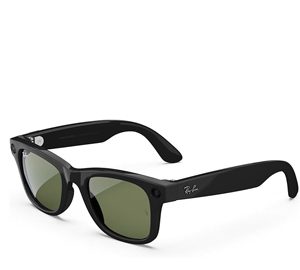

Ray-Ban Meta Smart Glasses
Best for: Photos, Video & AI- 12MP Ultra-Wide Camera
- Hands-Free Photo & Video
- Meta AI Voice Assistant
- Open-Ear Speakers
- Livestream to Social Apps
- Iconic Ray-Ban Styling
- Premium Price Tag
- Limited Color Options
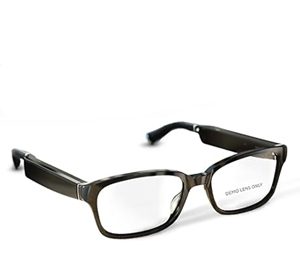

Amazon Echo Frames
Best for: Alexa Users & Prescription Wearers- Alexa Built-In
- Clear Open-Ear Audio
- Prescription Ready
- Lightweight All-Day Frame
- Hands-Free Calls
- Blue Light Filtering Lenses
- Audio-Focused Design
- Best With Alexa
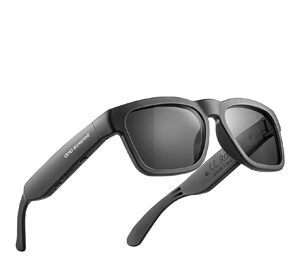

OhO Smart Glasses
Best for: Value & Outdoor Wear- Built-In Bluetooth Speakers
- Voice Control
- Polarized Lenses
- UV Protection
- Budget-Friendly Price
- Lightweight Design
- Simple Feature Set
- Basic Companion App
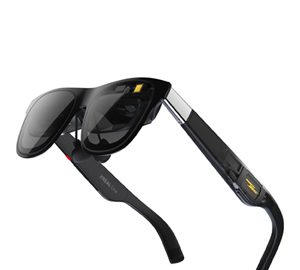

XREAL Air 2 Pro
Best for: Movies, Gaming & Travel- Big-Screen AR Display
- Sharp Micro-OLED Picture
- Adjustable Lens Dimming
- USB-C Plug and Play
- Works With Phones & Laptops
- Immersive Viewing
- Wired Connection
- Best for Viewing Sessions
Smart Glasses Compared at a Glance
| Model | Best For | Camera | Audio | Display | Score | |
|---|---|---|---|---|---|---|
| Ray-Ban Meta | Photos, video & AI | Yes | Open-ear | No | 9.4 | Check Price → |
| Echo Frames | Alexa & prescription | No | Open-ear | No | 9.2 | Check Price → |
| OhO | Value & outdoors | No | Bluetooth speakers | No | 9.0 | Check Price → |
| XREAL Air 2 Pro | Movies & gaming | No | Built-in speakers | Yes (AR) | 8.8 | Check Price → |
We Bought & Tested The Most Popular Smart Glasses, Here's How They Compare
Every pair on this list did its main job well. The differences came down to what each one is designed for, so instead of naming a single winner, we've shared who each model suits best.
Ray-Ban Meta: The Most Complete Everyday Package 9.4
In our testing, the Ray-Ban Meta glasses felt the most like "normal" glasses that just happen to be smart. The built-in camera made it easy to grab quick photos and short clips from your own point of view, and the Meta AI assistant answered questions, read messages and described what was in front of us with a simple voice command.
The open-ear speakers were clear enough for podcasts and calls on a quiet street. They sit at the premium end of the range, but the build quality and features help justify the price, and the charging case makes topping up easy.
Amazon Echo Frames: Easy Alexa, All Day 9.2
Echo Frames are all about audio and voice control. With Alexa built in, we could set reminders, control smart home devices and hear notifications without reaching for a phone. The frames are light, and since they can be fitted with prescription lenses, they work as your everyday glasses.
They focus on audio rather than a camera, which many people actually prefer for privacy. Alexa fans will get the most out of them, especially with smart home devices.
OhO Smart Glasses: Simple Features, Friendly Price 9.0
OhO keeps things simple. You get Bluetooth speakers for music and calls, voice control through your phone, and polarized lenses with UV protection, all for much less than the big-name models. During outdoor walks and drives, the polarized lenses cut glare noticeably.
It keeps the feature list simple on purpose, and for many buyers a comfortable pair of sunglasses that also plays music and takes calls is exactly what they need.
XREAL Air 2 Pro: A Big Screen You Can Wear 8.8
XREAL takes a different approach. Plug the glasses into a compatible phone, laptop or console with USB-C, and a large virtual screen appears in front of you. Picture quality from the Micro-OLED display was sharp, and the adjustable dimming helped us focus on the screen on flights and train rides.
They connect with a single USB-C cable and shine during movie and gaming sessions. As a portable home theater, they're a lot of fun.
How to Choose the Right Smart Glasses
1. Start With Your Main Use
Photos and AI, everyday audio, or a wearable screen? Each type is built for a different job.
2. Check Comfort and Fit
If you'll wear them for hours, look for a light frame and ask whether prescription lenses are an option.
3. Think About Your Devices
Some glasses work best with a certain assistant or phone. Make sure yours is supported.
4. Weigh Battery vs. Features
Cameras and displays use more power. Simpler audio glasses usually last longer per charge.
Our Quick Picks
Harrison Caldwell
A recognized expert in personal health and wellness technology, with extensive experience in researching and analyzing innovative digital health solutions. His deep understanding of wearable fitness devices, smart wellness tools, and telehealth advancements, combined with hands-on testing, makes him a trusted source for those seeking the best technology to enhance their health and well-being.